

Secure hosting and access control for apps built with AI
Open the way for what you’ve built
Your tool works. Share it with confidence, and let your team run with it.
Apervia gives it a safe place to run, with single sign-on and access for exactly the right people, so your business can start relying on it. No servers to manage.
No security expertise needed.
The Problem
Why apps built with AI get stuck before your team can use them
Making the tool is the quick part.
AI app builders like Lovable and Claude Code have put software in everyone’s hands, and businesses are filling up with useful internal tools. A finance lead makes a reconciliation tracker. An events manager makes a check-in app. A sales lead makes a deal board that fills itself from HubSpot.
What comes next takes longer. Every one of those tools needs somewhere to run, a proper login, the right permissions, safe connections to your systems, backups and monitoring. Do that once and it’s a job. Do it for every tool your teams make and it’s specialist work most businesses don’t have the people for.
So tools stay on personal accounts, shared by link and quietly depended on, with nobody in IT aware they exist. Apervia gives them somewhere better to go.
Features and benefits
Apervia features: access control, secure hosting and governance
Set up once.
Every app is covered.
Every app your teams make needs the same things: a sign-in, permissions, safe connections, backups and someone watching over it.
Apervia provides them once, for every app, so nobody has to work them out from scratch. Powerful technology, very little ceremony.
Who can use it?
Only the people you choose.
Share a tool with the team that needs it, and nobody else.
- Everyone signs in once with their work account
- You choose who can open each app
- Each app has its own verified identity, so your other systems always know which app is asking
Technical detail: Single sign-on (SSO), role-based permissions per application and a verified identity for every app.
Where does the data go?
Only where you’ve allowed
Your apps reach your other systems, and AI, through routes the business controls.
- Connections to tools like HubSpot are managed in one place
- AI only uses the models you’ve approved, and only the information it needs
- You can see which AI is being used and what it costs
- Run everything in the cloud or on your own servers
Technical detail: Centrally governed connections [confirm: owned at organisation level], AI governance across OpenAI, Anthropic or on-premises models, controlled access to organisational context, usage and cost oversight, and cloud or on-premises deployment
Who looks after it?
Apervia does, in the background.
The checks and safety nets a technical team would put in place, without needing one.
- Each app is kept apart from every other
- Try changes safely before your team sees them
- Go back to a working version if an update goes wrong
- Regular backups
- Regular checks for security weaknesses, with a record of every security decision
Technical detail: Isolated application spaces, separate environments, versioned releases with rollback, backups, vulnerability scanning, network monitoring and a security decision log.
Comparison Table
| Apps managed one by one | Apervia | |
|---|---|---|
| Sign-in | A different login for each app, or none | One sign-in across every app |
| Who can open it | Set up separately in each app, if at all | Chosen per app, managed in one place |
| Connections | Each app holds its own access to your systems | Governed centrally |
| AI | Each app uses whichever model it was set up with | Approved models only, with cost in one view |
| Backups and rollback | Depends on the platform it was made on | The same for every app |
| Security checks | Depends on who made it | The same checks on every app |
| Visibility | IT finds out when something goes wrong | Everything running, in one view |
How it works
How to get an AI-built app in front of your team
Three simple steps from your screen to your team.
1
Bring in what you’ve built
Move your app off the platform you made it on and into its own secure space. [Confirm: supported platforms and whether any changes are needed.]
2
Choose who can use it
Give access by team or by person. For example: sales and marketing see the deal board. Nobody else does.
3
Open it up
The people you’ve chosen can start using it straight away. Apervia keeps it running, backed up and monitored from then on, and you can test changes before your team sees them.
What’s included
What’s included: single sign-on, hosting, security and governance
Powerful technology, very little ceremony.

One sign-in, the right access
Single sign-on (SSO) across every app, a verified identity for each one and role-based permissions you set per app.

A safe space for every app
Each app runs in isolation, with separate environments for trying changes, releases you can roll back and regular backups.

Connections you control
Link apps to the systems you already use, with every connection governed centrally.

Security that runs in the background
Vulnerability scanning, network monitoring and a full record of security decisions, without anyone on your team running them.

Cloud or on-premises deployment
Run Apervia in the cloud or on your own infrastructure, with the same controls either way.
Use cases
A HubSpot deal board, made with AI and shared securely
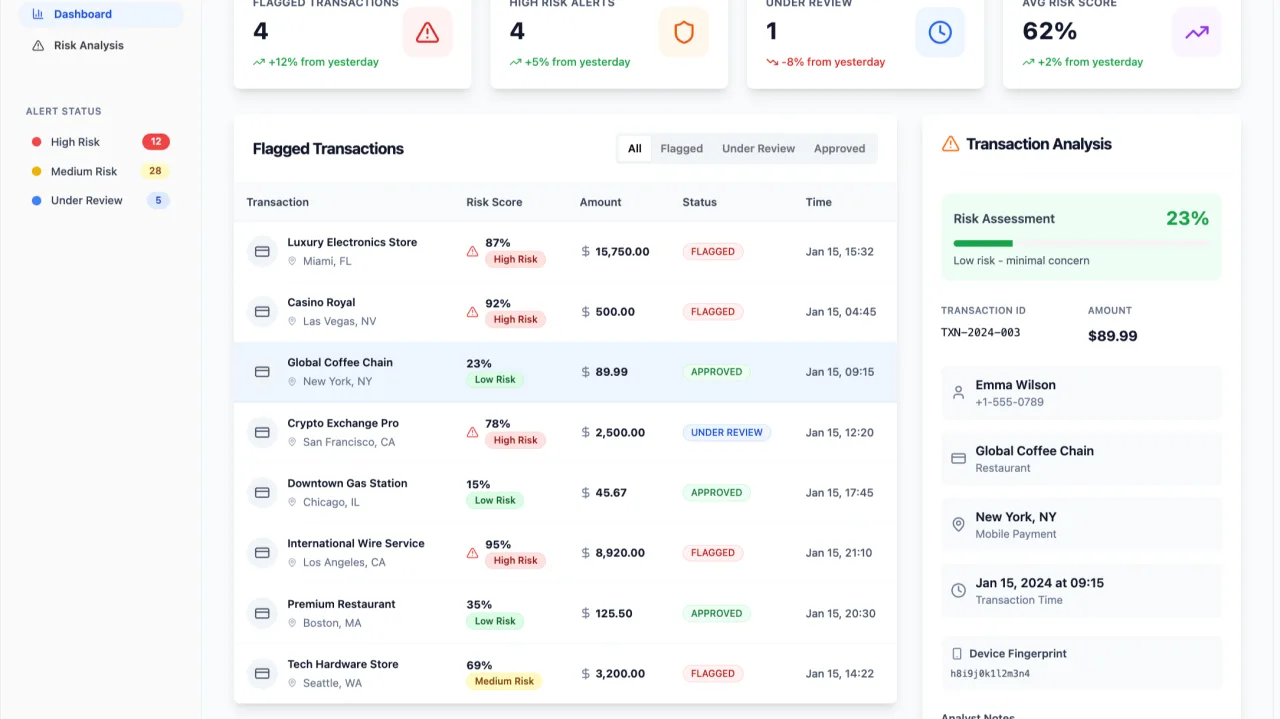
One deal board, before and after.
Your sales lead makes a deal board that pulls new deals from HubSpot. The team starts using it daily. It lives on her personal account, anyone with the link can open it and IT doesn’t know it exists.
On Apervia, it runs in its own secure space. Sales and marketing sign in with their work accounts and everyone else is kept out. The HubSpot connection is governed centrally, the app is backed up and monitored, and if an update causes problems, she can roll it back.
For everyone involved
Apervia for builders, innovators, IT teams and business leaders

For the person who made it, and the people who sign it off.
Your sales lead makes a deal board that pulls new deals from HubSpot. The team starts using it daily. It lives on her personal account, anyone with the link can open it and IT doesn’t know it exists.
On Apervia, it runs in its own secure space. Sales and marketing sign in with their work accounts and everyone else is kept out. The HubSpot connection is governed centrally, the app is backed up and monitored, and if an update causes problems, she can roll it back.

If you made it
Get your tool in front of the people who need it without learning about servers, security or infrastructure. You decide what it does. Apervia handles where it runs.

If you run the business
Let teams solve their own problems with software while keeping risk in view. Every app that uses AI goes through one place, so usage and cost are visible long before they become a surprise.

If you look after IT and security
Give AI-built tools a governed place to be deployed, with single sign-on, central control of connections and a record of every security decision. If you’ve had to block these tools before, or found them running as shadow IT, Apervia gives you a way to say yes.
Room to grow
One platform for every business app, however it was made
Build software around your business, not your business around software.
Apervia starts with the tools your teams make with AI. Apps built by developers and the ones your business already uses can run on the same platform, under the same controls, so everything sits in one place whoever made it.


Pricing
Apervia pricing

Priced per app, with the essentials on every plan.
Start with a set number of apps and add more as you grow. Single sign-on (SSO) and access control come as standard [confirm: on every tier]. Many platforms save those for enterprise contracts. We think every business that relies on its tools should have them.
From The Curve
About Apervia and The Curve


Made by people who build and run the technology businesses depend on.
Apervia is made by The Curve, a technology consultancy based in Sheffield. Since 2019, we’ve designed, built and managed business-critical software for organisations in finance, legal, health, education, manufacturing and the public sector. Apervia puts what we’ve learned into a platform anyone can use.
We’ve taken AI-built apps all the way
We’ve worked with an organisation who started life as an app made with AI. We made it work properly, now host it and have grown it into a wider piece of development.
We’ll tell you when it isn’t the right fit
Apervia looks after everything around your app. If what’s inside needs work, The Curve’s review service can look at how it was built and tell you whether to keep it, harden it or rebuild it. Sometimes the honest answer is that a tool isn’t worth saving, and we’ll say so.
We’ve seen the problem up close
Through our vibe coding reviews, we’ve looked inside apps businesses were already relying on. We’ve found login tokens stored where anyone could reach them, patient data sent to AI models routed around the world and health records with no multi-factor authentication. In each case, the tool worked. The gaps were in the parts nobody had been shown how to check. Apervia closes those gaps for every app, by default.
The people behind it
The Curve was founded by brothers Paul Ridgway (CEO) and James Ridgway (CTO). They’ve always believed technology should make work simpler, and that the people closest to a problem are often the best ones to solve it. That thinking runs through everything The Curve does: keep a close eye on what’s coming next, use it when it genuinely helps and keep it simple enough for anyone to pick up. Apervia is that belief turned into a platform.
Accreditations, Networks, and Associations





FAQs
All you want to know about Apervia
What is Apervia?
Apervia is a platform from The Curve that gives apps built with AI tools like Lovable and Claude Code secure hosting, single sign-on, access control and monitoring, so businesses can use them safely.
Can I use Apervia for vibe-coded apps?
Yes. Vibe coding means building an app by describing it to an AI tool, and those apps are exactly what Apervia is designed for. It gives them the hosting, sign-in, permissions and security they need before a business can rely on them.
How technical do I need to be?
Not at all. If you can make a tool with AI, you can use Apervia. It’s designed for people in finance, marketing, operations and events as much as developers.
How do I share an app I’ve built with AI with my team securely?
Bring your app into Apervia, choose who can use it and open it up. Your team signs in with their work accounts and only sees the apps they’ve been given access to, while Apervia handles hosting, backups, monitoring and security. [Confirm import steps for each platform.]
Which tools can I bring in?
[Confirm: Lovable, Claude Code, v0 and others, plus any limits on app type or size.]
How is Apervia different from hosting an app on Lovable or Vercel?
Lovable and Vercel are good places to make and host an app. Apervia is designed for what a business needs once it relies on many of them: one sign-in across every app, permissions by team, centrally governed connections, oversight of AI usage and cost, and the option to run on your own servers. [Confirm against current Lovable and Vercel features before publishing.]
What happens to the platform I made it on?
[Confirm: whether apps run independently of the original platform once moved, and whether customers still need a subscription to it.]
Does Apervia make my app secure?
Apervia secures everything around your app: who can reach it, where its data goes, and how it’s hosted, backed up and monitored. It also scans for vulnerabilities and flags what it finds. It can’t rewrite flaws inside the app itself, so if you’d like someone to check how it was built, [The Curve’s review service can help].
Can we run Apervia on our own servers?
Yes. Apervia runs in the cloud or on your own infrastructure.
What happens if something goes wrong?
Every app has releases you can roll back and regular backups, so you can return to a working version.
Where is our data held?
[Confirm: hosting location and any UK or EU data residency commitments.]
Is there a free trial?
[Confirm: trial length and what’s included.]
Get started with Apervia
Give what you’ve built the way in.
A safe place to run, and the right people to use it.